Hi @bevicky, thanks for your support! For urgent requests like these always get in touch with us via the in-app messenger click the ( ? ) in the bottom right > Chat with Us (On mobile tap your User Icon > Get Help > Chat with Us). Which new features are you not able to find? We’re in the midst of updating all our help center & guides at the moment.
1 Like
Thanks messaged via the in-app messenger. Just to clarify unable to figure out where is Flashcards, Tables & Maps and how to use them .
EDIT: Thanks for the help on the in message chat and the quick response!
1 Like
Thank you for two things (that I like the most in this):
- I can turn off the maps.
- The tables view is phenomenal for me.
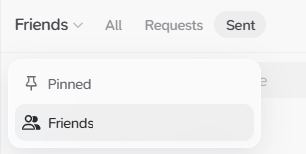
Hiya! Quick question re the windows app. I seem to be missing the pinned cards? THe top right now shows Friends instead.
Can you click on “Friends” in the top right corner? Then a little dropdown should open up, where you can switch to pinned cards:
1 Like
Ahh there it is, thank you very much! That dropdown was well hidden 
1 Like